Which is Best Animation Software for 2025
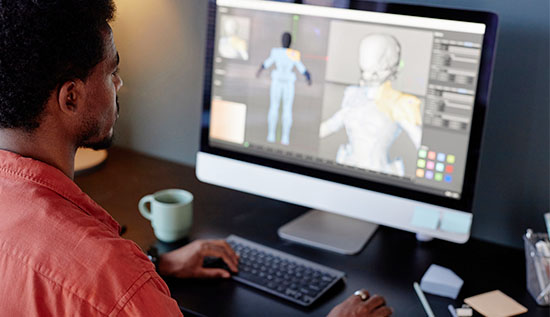
Create stunning animations in 2025 with the best software for animation! Compare easy 3D animation software and pro-grade platforms.
The world of animation is evolving rapidly, with animation software becoming more powerful, accessible, and versatile than ever. Selecting the appropriate tools may make or ruin your creative endeavors, regardless of your level of experience.
As we look ahead to 2025, the competition among best 3D animation software and 2D tools is fiercer than ever. This guide dives deep into the top contenders, free options, beginner-friendly platforms, and mobile solutions to help you find the best software for animation tailored to your needs.
The Evolution of Animation Software: What’s New in 2025?
By 2025 advancements in AI, real-time rendering and cloud collaboration are redefining animation software. Tools now prioritize intuitive workflows cross-platform compatibility and affordability also.
For example AI-powered motion capture and auto-rigging integrations are making complicated jobs easier to do, enabling even beginners to use 3D animation tools.
Important Trends to Consider:
- Automate monotonous activities like character rigging and lip syncing using AI powered tools.
- Cloud based technologies allow people to collaborate in real time beyond national boundaries also.
- Mobile optimization has made Android animation software more competitive with PC counterparts.
Top Contenders for the Best 3D Animation Software in 2025
Choosing the best software for animation can be daunting due to the abundance of possibilities. Finding the best animation software is important for realizing your ideas regardless of your level of experience. This list of the top alternatives for 2025 includes:
1. Blender (Free & Open-Source): In 2025 Blender is still a dominant force providing a comprehensive set of modeling rigging and rendering tools. Because to its active community and frequent updates it's a fantastic choice for both professionals and beginners.
2. Autodesk Maya (Premium): A staple in Hollywood, Maya excels in high-end 3D animation and VFX. Its 2025 updates include enhanced AI simulation tools for fluid dynamics and crowd scenes.
3. Cinema 4D (Mid-Range): Cinema 4D, which is well-known for its intuitive interface, is perfect for motion graphics professionals. Adobe After Effects compatibility is seamlessly integrated into the 2025 version.
Best Software for Animation Beginners in 2025
Starting your animation journey? Prioritize animation software for beginners that balances simplicity with functionality.
1. Pencil2D (2D Focus)
This open-source free program is ideal for animations that are hand-drawn also. The learning curve is lowered by its simple UI.
Step-by-Step Guide:
- Sketch your frames using the brush tool.
- Add layers for colors and backgrounds.
- Export as GIF or video.
2. Animaker (based on the cloud)
Animaker provides drag-and-drop templates for social media posts and also explanation videos. A collection of more than 10,000 pre-animated graphics is part of the 2025 upgrade.
Free vs. Paid Animation Software: Which Wins in 2025?
With the growing demand for high-quality animations choosing between free and premium best 3D animation software is a crucial decision for artists and studios alike. Free tools provide accessibility and flexibility while more costly options give industry grade capability and support.
But which software is best for animation in this 2025? Let's dissect the best options in each group.
Best 3D Animation Software Free Options
- Blender: The most widely used free animation software as of 2025 is still this open source powerhouse also. For modeling, texturing, rigging and also rendering it provides an extensive toolkit. However, mastering its advanced capabilities demands attention due to its steep learning curve.
- Daz 3D: Ideal for beginners and those who need pre-built assets, Daz 3D provides a user-friendly interface and ready-made characters for quick animations. While it's powerful for character design, customization is somewhat limited compared to other tools.
- SculptGL: For concept sculpting and fast modifications, this lightweight browser-based sculpting tool is perfect. For artists who want to experiment with 3D modeling while on the road it's still a great option, even if it's not as sophisticated as standalone software.
Premium Tools Worth the Investment
- Maya: The industry standard for expensive 3D animation and visual effects, Maya costs $1,620 annually. Major studios use it because of its sophisticated simulation tools motion capture integration and potent rendering capabilities which make it an essential tool for experts.
- Cinema 4D: Motion graphic artists and freelancers love Cinema 4D, which costs $94 a month. It is the preferred option for people in the media, design and also advertising industries due to its user friendly interface, smooth interaction with Adobe After Effects and powerful rendering capabilities.
Which Software Is Best for Animation?
If you're just getting started or working on a personal project free software like Blender provides all of the necessary tools for free. However purchasing high-end software like Maya or Cinema 4D can significantly enhance your workflow and final output if you wish to work in a professional studio or require sophisticated features for commercial projects.
Regardless of your choice, the best software for animation depends on your needs budget and level of expertise. In 2025, producing breathtaking 3D animations will depend on your ability to learn the program you choose whether it's a free or commercial tool.
Animation Software for Android
Gone are the days when mobile tools were just simple gimmicks. In 2025, animation software for Android has evolved into powerful creative tools, enabling artists, students and professionals to work on animations anytime, anywhere. Mobile apps offer flexibility without sacrificing quality, be it making a storyboard, animating a short video or exploring with stop-motion techniques. But which software is used to create animation efficiently on Android? Let’s explore the best options.
Top Android Animation Apps
- FlipaClip: One of the most popular animation software for Android, FlipaClip offers intuitive frame-by-frame drawing tools, onion skinning and audio syncing to help animators create smooth and professional-looking animations.
- Stop Motion Studio: Suitable for both novices and experts, this application makes it simple for users to produce stop-motion animations by utilizing their Android camera to take pictures and combine them into seamless sequences.
- Toontastic 3D: Designed for educators and storytellers, Toontastic 3D is ideal for children and amateur animators since it allows users to create animated stories using 3D characters and settings.
FlipaClip Example: Animating on the Move
Imagine a high school student passionate about animation but without access to a PC. While commuting to school, they open FlipaClip on their Android tablet and begin sketching characters frame by frame. Using onion skinning and layering, they refine movements and add audio effects.
By the time they reach their destination, they’ve completed a polished 30-second cartoon, ready to share on social media.
Why Choose Mobile Animation Software?
- Portability: Work on animations anywhere, whether at home, in a café, or while traveling.
- Affordability: Many Android animation apps are free or available at a low cost, making them accessible to all.
- Ease of Use: Mobile apps are designed with user-friendly interfaces, making them great for beginners while still offering advanced features for professionals.
While mobile tools may not yet match the capabilities of high-end desktop software, they are rapidly improving. If you're wondering which software is used to create animation while on the move, Android apps like FlipaClip and Stop Motion Studio are excellent choices for bringing your creative ideas to life anytime, anywhere.
How to Choose the Right Animation Software in 2025
The best animation software for you will depend on your platform budget and level of expertise.
1. Skill Level: Beginner or Pro?
Beginners can start with best 3D animation software free professionals may like Maya or Cinema 4D for more sophisticated capabilities as well as alternatives like Blender or Daz 3D.
2. Budget: Free or Paid?
- Free: Best 3D animation software free tools like Blender offer pro-level features at no cost.
- Paid: Industry norms include Maya ($1,620/year) and also Cinema 4D ($94/month).
3. Platform: Desktop, Cloud or Mobile?
- Desktop: Most animation software like Blender and Maya runs on powerful PCs.
- Mobile: Animation software for Android, like FlipaClip allows animation on the go.
Blender is the finest choice for free options. Professionals should invest in Maya or Cinema 4D. Start animating after making a decision depending on your needs!
Read More: How to Become a 3D Modeler: Salary & Portfolio Tips
Conclusion
Choosing the best animation software in 2025 depends on your skill level, budget, and project needs. If you must best 3D animation software, easy 3D animation software, or animation software for beginners or for you, there is the ideal tool. The options are endless ranging from free alternatives like Blender to industry titans like Autodesk Maya.
Take the time to look over the alternatives and also select the animation software that best meets your demands. Each program has capabilities that are specific to its own needs. Start exploring today and bring your creative visions to life!
Read More: What is Software Developer Salary From Freshers to Managers?
More Articles
 17 Jul 2026
Rust vs Go: Which Language Is Better in 2026?
Compare Rust vs Go in 2026, including performance, backend development, memory safety and the best language for your projects.
 15 Jul 2026
What Is Synthetic Data? Benefits, Uses & Examples
Understand synthetic data explained, its benefits and real-world AI examples that improve privacy and machine learning.
 14 Jul 2026
Best Mobile Networks in Cambodia (2026 Guide)
Discover the best mobile networks in Cambodia in this 2026 guide. Compare coverage, speed, pricing, and find the best SIM card in Cambodia for tourists, travelers, expats, and residents.
 13 Jul 2026
How to Rank in ChatGPT Search Results: GEO & AI SEO
Improve how to rank in ChatGPT search results with provenGEO strategies, ChatGPT SEO and AI search optimization tips.