How to Turn Text into Video Using ChatGPT Video Generator
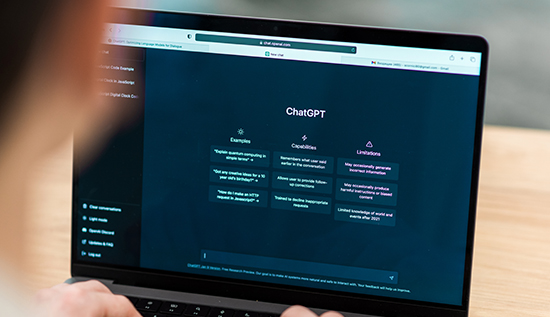
Discover how to create stunning videos with ChatGPT video generator using AI tools in an easy step-by-step method.
The demand for AI content creation continues to skyrocket, especially with tools that automate and elevate the visual experience. One revolutionary advancement in this field is the ChatGPT video generator. This tool has taken content marketing, education, and entertainment to a whole new level by allowing users to create videos with ChatGPT simply from text inputs.
A ChatGPT video AI tool can help you make powerful content in only a few minutes whether you're a content creator, digital marketer or teacher. It's not just about automating things; it's also about using images to make complicated communications easier to understand.
Why AI Video Generator ChatGPT is a Game-Changer
In a world where attention spans are shrinking, video content has become king. Thanks to the AI video generator ChatGPT, turning ideas into engaging visuals is now easier and more effective than ever.
Unlike traditional video editing software, which requires technical skills and countless hours, the ChatGPT video creation tool simplifies everything. Just type your script or content idea, and let the OpenAI video generator do the rest. The process reduces the time it takes to create content while increasing its quality and relevance.
Benefits of Using Text to Video with ChatGPT
The ChatGPT video generator has a lot of benefits, especially for people who need quick, scalable and effective way to make video content. You don't need to hire a production team or buy expensive equipment with this tool.
The text to video with ChatGPT feature transforms simple written content into dynamic, high-quality videos. It also enhances AI content creation by offering customization options for themes, voices, and styles. This flexibility is perfect for businesses that want to maintain brand consistency across their video marketing efforts.
Step-by-Step Guide to Using ChatGPT for Videos in Marketing
Understanding how to generate a video using ChatGPT can significantly improve your digital marketing campaigns. The process is both intuitive and powerful.
- Start by feeding your text: whether it’s a product description, a blog summary, or an educational script—into the ChatGPT video creation tool.
- Select the video style: animated or live-action—based on your preferences and project needs.
- The OpenAI video generator automatically converts: your content into a video format using the selected style.
This step-by-step process eliminates manual editing, allowing you to focus on messaging and strategy instead.
How ChatGPT Video Generator Supports AI Content Creation
The rise of AI content creation tools like the ChatGPT video generator signifies a shift in how brands and creators communicate. Rather than relying solely on static text or images, video becomes the medium of choice, thanks to tools that blend automation with creativity.
With ChatGPT, an AI video generator even tiny businesses can make content that seems like it was made by an expert. This makes things fairer and give more producers a chance to reach people on sites like YouTube, TikTok and Instagram.
Key Features of ChatGPT Video AI Tool in Content Strategy
Having the correct tools is a key element of any successful content strategy and the ChatGPT video AI tool is one of the most useful. This technology does more than just convert video; it lets you add tone, emotion, and storyline to them.
The AI video generator ChatGPT includes features such as voiceovers, subtitles, transitions, and even background music, all selected through AI-based prompts. You can also update and edit existing videos using the ChatGPT video creation tool, making your content evergreen and adaptable.
Read more: How to Use ChatGPT Cambodia to Boost Work Productivity
Creating Compelling Visual Stories with ChatGPT
Storytelling is an art, and with the ChatGPT video generator, it becomes accessible to everyone. By turning plain text into captivating visuals, the OpenAI video generator supports the emotional engagement that video content offers.
If you want to create videos with ChatGPT that really connect with your audience, tell stories that they can relate to. The tool adds tone, timing, and structure to make sure your message gets across.
The Efficiency of a Text to Video Converter
One of the most valuable aspects of the ChatGPT video generator is its functionality as a text to video converter. This allows marketers and educators to repurpose written material into engaging formats with minimal effort.
This AI video generator ChatGPT gives you a great return on investment whether you're using it for social media marketing or online classes. It changes your writing into something that is easier to read and understand which helps people remember and stay interested.
Future Trends of OpenAI Video Generator in Digital Marketing
As AI evolves, tools like the OpenAI video generator will continue to redefine digital communication. We can expect more personalization, real-time video editing, and cross-platform integrations in the future.
Businesses that create videos with ChatGPT today are not just keeping up—they are staying ahead. With growing capabilities, the ChatGPT video AI tool may soon enable live video interactions, AI avatars, and multilingual support for global reach.
Conclusion
The ChatGPT video generator is revolutionizing the way we think about video content. It allows anyone—regardless of technical skill—to produce high-quality videos using simple text input. Through the power of the AI video generator ChatGPT, users can create engaging, personalized, and scalable videos that amplify their message.
Whether you're a small business owner, digital marketer, or educator, using the ChatGPT video creation tool adds immense value to your content strategy. By embracing text to video with ChatGPT, you’re not just keeping up with the trend—you’re shaping the future of AI content creation.
Read More: Benefits of Using ChatGPT in Recruitment – Pro Tips
Frequently Asked Questions
1. What is a ChatGPT video generator?
Using OpenAI technology, it turns written content into video format with the help of AI.
2. How do I create videos with ChatGPT?
You type your content into the interface, change the images or voice, and the program makes the movie for you.
3. Is the ChatGPT video creation tool suitable for beginners?
Yes, it’s designed with user-friendliness in mind, requiring no prior video editing skills.
4. Can I use the ChatGPT video AI tool for YouTube content?
For sure. A lot of producers utilize it to swiftly turn their script or blog into videos that are ready for YouTube.
5. How does the OpenAI video generator enhance AI contents creation?
It speeds up the process, makes it more efficient, and allows it to work on many platforms and for many purposes.
6. Is the text to video with ChatGPT process customizable?
Yes, users can select themes, voices, pacing, and add subtitles or music as needed.
7. Where can I find a step-by-step guide to using ChatGPT for videos?
There are a lot of tutorials online, but the application itself typically has built-in help for beginners.
More Articles
 26 Mar 2026
ChatGPT Tips and Tricks – Hidden Features & Pro Guide
Get better outputs with chatgpt tricks, smart prompting methods, and expert-level strategies for using ChatGPT tutorial more efficiently.
 25 Mar 2026
Video Downloader (2026) – Free Online Tools, No Watermark
Discover the best video downloader tools in 2026. Learn how to use free online video downloader platforms, download video from URL, and explore HD, watermark-free solutions for YouTube, TikTok, Facebook, and Instagram.
 25 Mar 2026
Gaming Apps That Pay Money – Best Legit Apps 2026
Discover gaming apps that pay money in 2026. Learn how to play games and earn money safely with legit apps and simple tips for beginners.
 25 Mar 2026
Best Apps for Android 2026 – Top Free & Must-Have Apps
The best apps for android 2026 list covers top free apps and trending downloads for modern smartphone users.