How to Tell If a Video Is AI-Generated: Signs to Check
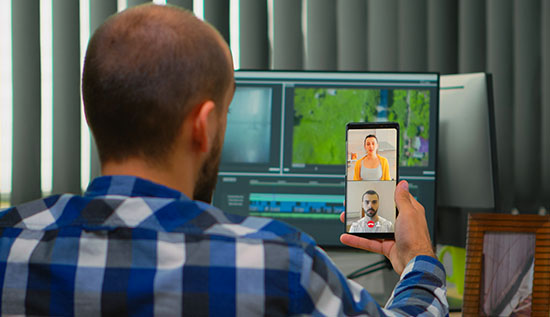
Detect AI-generated videos and practical examples, verification methods and reliable AI video detection techniques.
AI has changed the way videos are made faster than anyone thot possible. Using AI-powered tools, anyone can now make realistic videos of people talking, virtual hosts, movie scenes from text prompts and even lifelike copies of historical figures.
These new technologies have brought about exciting new possibilities for businesses, marketers, educators and people who make content, but they have also made things more difficult. More and more people are falling for fake news, misinformation, identity fraud, deepfakes and manipulated media. This makes it hard for people to tell the difference between real content and content made by artificial intelligence (AI).
This growing concern has led many people to ask how to tell if a video is AI generated. Knowing how to spot AI-generated videos has become an important part of digital literacy. This is true whether you're on social media, watching news clips, looking over evidence or checking material before sharing it.
Fortunately, most of the time, videos made by AI leave little clues. Modern AI models keep getting better but many of the videos they make still have visual flaws, movements that don't look natural, lighting mistakes, strange facial expressions or audio that doesn't match up. Careful watchers can spot these problems. Learning these signs can help stop the spread of false information and make you a better critical reader of online content.
In addition to manual observation, technology has also evolved to help users verify suspicious content. Several AI video detector tools now analyze videos using machine learning algorithms to identify whether footage has likely been created or manipulated by artificial intelligence. These solutions provide another layer of verification, although no detection method is currently perfect.
This comprehensive guide explains how to tell if a video is AI generated, talks about common audio and visual signals and the tools that can be used to find them and gives examples from everyday life that anyone can use. By the end of this section, you'll better understand how to detect AI-generated videos, recognize common deepfake characteristics, and evaluate online videos more confidently before believing or sharing them.
Why AI-Generated Videos Are Becoming Harder to Detect
In the past few years, artificial intelligence has come a long way in making videos. Earlier AI videos often had obvious flaws, like faces that were distorted, blinking that didn't make sense and movements that didn't look right. The models we use now make images that are much smoother, have better lighting, better lip sync and look a lot more like real people.
AI video generators today use diffusion models, transformer architectures and neural rendering methods to make very convincing video from text prompts or reference pictures. Companies now use these tools to make marketing videos, avatars for service to customers, training materials, lessons, product demos and presentations in multiple languages.
Unfortunately, you may also misuse the same technology. Some popular examples include the following: phony conversations with famous people, politics-related false information, phony ads for business opportunities, fraudulent deepfake identities, misleading product evaluations, conspiracy videos with fake voices and fabricated evidence on social media.
This is exactly why many internet users now search for how to tell if a video is AI generated before trusting suspicious content.
Even though AI technology keeps getting better very quickly, it still has trouble with some of the more complicated features that humans naturally come up with. Small mistakes are often hard to see because they are hidden in things like lighting, reflections, body language, facial expressions or the background.
Learning these subtle clues is the first step in AI-generated video detection without requiring advanced software.
How to Tell If a Video Is AI Generated: 12 Signs to Check
Knowing how to tell if a video is AI generated involves examining multiple elements instead of relying on one obvious clue also. Seeing how easily the video acts in terms of facial movement, audio synchronization, lighting and physical consistency is the most accurate way to tell.
1. Unnatural Eye Movement: People's eyes naturally blink at odd times. When AI makes faces, blinking might look too little or too much and eye movements might feel a little off or not match up and how to know if a video is AI generated. Eyes may not always reflect light in a natural way or they may not always move together fully. Even the most advanced AI systems still have trouble fully copying how eyes work.
2. Lip Sync Doesn't Match Audio: One of the easiest clues in how to identify AI-generated videos is poor lip synchronization. The mouth might move before the audio starts, keep moving after the speech stops, or not match the pronunciation correctly. Sometimes, mouth movement is completely missing or doesn't look right. Even though later models are much better, these problems are often more obvious when speech is longer or more complicated.
3. Strange Facial Expressions: Human facial movements are smooth and well-coordinated, but faces made by AI can look stiff or a little off. You might see smiles that look frozen, eyebrows that don't move in time with feeling and reactions that are slow or emotionally flat. In close-up shots, where face details are easier to see these problems stand out even more.
4. Fingers and hands look strange: For AI to make properly, hands are still one of the hardest parts. Fingers may look like they are missing, merged or positioned in ways that aren't possible. Hands can also change shape between frames, especially when moving quickly or making gestures also. This makes them a strong sign of fake video content.
5. Inconsistent Lighting: In the real world, lighting follows predictable physical rules. However, these rules aren't always followed in AI-generated videos. Shadows may not move right; faces may look too bright compared to the background or reflections may come from angles that don't make sense. Sometimes, it looks like different parts of the scene are lit by different, shaky sources of light.
6. Background Objects Change: Instability in the background is another usual sign. Between frames, things like buildings, trees, or furniture may move, disappear or change shape in small ways. Walls may bend or move a little, especially if the subject or camera is moving. When you look closely at the background, you can often find problems that aren't clear at first also.
7. Hair Appears Unrealistic: Hair is made up of thousands of fine strands, which AI often struggles to render consistently. It may appear to float, blend into clothing or change shape between frames. Edges around the hairline can also look soft or incomplete, especially in longer hairstyles where detail complexity increases.
8. Skin Texture Looks Too Perfect: Faces made by AI often look too smooth, like they were painted or made of plastic. Even though flawless skin by itself isn't proof of AI generation, other visual flaws that are present make it more likely.
9. Voice Sound Artificial: AI voice technology has come a long way, but some synthetic voices still sound a little off. They might not show different emotions, have a steady beat, or have strange stops and breathing patterns. Some voices may also repeat the same rhythms of pronunciation in a way that doesn't sound human.
10. Frame Flickering: AI-generated videos sometimes struggle with frame-to-frame consistency. This can result in flickering textures, shifting skin tones, disappearing objects how to tell if a video is AI generated or clothing that subtly changes between frames. Background elements may also flicker or distort when the video is paused or replayed.
11. Inconsistent Jewelry or Clothing: In AI videos, small accessories like earrings, necklaces, glasses, buttons, and watches may act in strange ways. They could suddenly go away, come back or change shape. It's often easier to see these small changes when you watch the video slowly.
12. Unrealistic physics: The way people move follows natural physical laws, but films made by AI may break them. Things may float, people may move in strange ways, clothing may ride up and down the body and walking patterns may not look quite right. When several physical inconsistencies show up at the same time the chance of AI generation goes up by a lot.
Tools and Methods for AI Video Detection
While manual observation is valuable, software can also help verify suspicious videos. Several organizations have developed AI-generated video detector platforms that analyze digital patterns invisible to the human eye.
Pixel consistency, face features, frame transitions, metadata, compression artifacts and neural rendering signatures are some of the things that these systems look at. Many researchers continue improving AI video detection technologies as AI generation models become more sophisticated.
However, no detector currently guarantees 100% accuracy. Instead, use more than one way to check, like looking for visual problems, making sure you're looking at the original source, seeing when the article was published, comparing it to news sources you trust, going backward thru key video frames, looking at metadata when it's available and using more than one detection tool. The best way to protect yourself from fake news is to use both human observation and technology together.
Real-World Examples of AI-Generated Video Detection
As AI-made movies get more like the real thing, seeing examples from real life is one of the best ways to learn how to spot AI-generated videos. Sometimes, warning signs can be hard to spot on their own, but it's much easier to spot patterns when you see how multiple clues show up together in real cases. By carefully observing and verifying, the following examples show how to spot content that was made by AI.
Example 1: Fake Celebrity Investment Advertisement
Cryptocurrency ads on social media feature a famous person. After a quick look, everything seems accurate. Lip movements are slow compared to speech, the voice lacks genuine emotion, reflections in the background change in strange ways and earrings disappear between frames. Viewers correctly conclude that the ad was made by AI after noticing several hints.
Example 2: Fake News Interview
A video that went viral says that a government official said some things that were not acceptable. The blinking of the eyes doesn't look realistic, the expressions on the face stay static, the lighting changes when the head moves and the voice pacing sounds like it was made by a computer. Later, fact-checking groups confirmed that the interview was made with artificial intelligence (AI).
These examples demonstrate why understanding how to tell if a video is AI generated has become increasingly valuable for journalists, businesses, educators and everyday internet users.
Best Practices for Verifying Suspicious Videos
If you see something sketchy online, don't jump to conclusions right away, even if the video seems real at first glance or is getting a lot of shares on social media.
Follow a structured verification method that helps you evaluate the content one step at a time instead of acting on impulse or based on how you feel.
First, carefully look at how good the video looks. Pay attention to things like how the lighting stays the same, how the background stays the same and whether items behave naturally from one frame to the next. Many times, small facial flaws can show that someone is manipulating you.
Next, look for more than one warning sign instead of depending on one odd thing. One glitch or strange moment doesn't always mean that a video is fake. However, a group of problems like an unnatural voice, strange facial expressions and shadows that don't match up can be a stronger sign that the video was made by AI.
After that, check the original source. Look at the source's account history, credibility and past posts to see if they have shared trustworthy or verified material. Accounts that are brand new or private are often not as reliable also.
If the video is said to be from a major news source, don't trust reposts; instead, go to the publisher's website or social media accounts directly. A lot of fake videos go around with misleading logos or captions that look like they came from real news sites.
Search whether other trusted media outlets reported the same event. If a major incident truly occurred, it is usually covered by multiple reputable sources. The absence of independent reporting can be a red flag.
Key frame reverse picture searches should be used as much as possible. You can find out if the video has been used before in a different setting or has been changed by looking for screenshots of the video online.
If available, analyze the file using an AI video detector or other verification software. These tools can help identify patterns associated with synthetic media, although they should be used as supportive evidence rather than absolute proof also.
Lastly, be critical and think about what the content is trying to say. Before sharing a video that seems meant to anger, scare, shock or excite people, be extra careful because emotionally charged content is often used to quickly spread false information.
Following these habits makes AI-generated video detection significantly more reliable than depending on any single clue, helping you make more informed and responsible decisions when engaging with online media.
Conclusion
AI is changing how digital content is made and in just minutes it's now easier than ever to make movies that look real. These new technologies make learning, fun, marketing and talking to each other more possible, but they also make it easier for fake news, scams and skewed media to spread. As AI technology keeps getting better, everyone who uses the internet should learn how to think critically about digital content.
Understanding how to tell if a video is AI generated is no longer limited to cybersecurity professionals or digital forensics experts. People who watch TV on a regular basis can spot a lot of warning signs by paying more attention to things like lighting, hand details, background consistency, voice quality, clothes, facial expressions and how people naturally act. Even though there isn't a single sign that a video is fake, a group of errors often point to it being made or manipulated artificially.
Technology also plays an important role in modern verification. Advances in AI video detection keep making it easier for researchers, journalists, companies and fact-checking groups to spot media that has been tampered with.
But automated tools shouldn't take the place of careful observation and critical thought. Combining manual review with an AI-generated video detector, source verification, metadata analysis and trusted fact-checking resources provides the most reliable approach.
As AI-generated content becomes increasingly sophisticated, staying informed will be your strongest defense also. Continue practicing how to tell if a video is AI generated by carefully looking at videos that seem fishy instead of taking them at face value.
It gets a lot easier to spot small inconsistencies over time. These skills will help you get around in the digital world with more confidence, accuracy and trust, whether you're looking out for scams, checking the news or making sure that content is shared responsibly.
Read More: Green AI Explained: Benefits & Examples
More Articles
 12 Aug 2026
Best Payment Gateways in Cambodia: 2026 Comparison
Compare the best payment gateways in Cambodia in 2026, including ABA PayWay, ACLEDA, Sathapana, Canadia, Wing, KHQR and features.
 11 Aug 2026
AI Scams in Cambodia: Types & Warning Signs
Learn about AI scams in Cambodia, common warning signs, how AI fraud works, and practical ways to protect yourself from artificial intelligence scams in Cambodia in 2026.
 07 Aug 2026
Green AI Explained: Benefits & Examples
What is Green AI? A complete guide to sustainable AI benefits and examples of efficient technology for a greener future.
 05 Aug 2026
How Much Does SEO Cost in Cambodia? Pricing Guide
SEO cost in Cambodia explained with pricing ranges and expert tips for choosing the right SEO provider.