Session Hijacking: How It Works and How to Prevent It
Learn what session hijacking is, how session cookie theft works, common attack signs, and effective prevention strategies to protect accounts and web applications.
Online security is important for everyone who uses websites, mobile applications, email services, online banking, or business platforms. Every day, people log in to websites to access personal information, manage accounts, communicate with others, and complete online transactions. However, these activities can create security risks when attackers find ways to take control of an authenticated session.
Session hijacking is a cybersecurity attack in which an attacker takes over an active user session to access an account or application without the user's permission. Instead of trying to discover a password, an attacker may attempt to obtain a valid session token or exploit weaknesses in how a website manages authenticated sessions.
A session hijacking attack can affect individuals, businesses, and organizations. Depending on the account and the permissions available, unauthorized access may expose personal information, business documents, private messages, or sensitive customer data.
Understanding what session hijacking is, how it works, and how to recognize its warning signs can help users and organizations improve their security. Website developers and security teams also need to understand the risks associated with session management, authentication, and browser security.
This article explains session hijacking in cybersecurity, common attack methods, session cookie theft, detection techniques, and practical strategies for preventing session-based attacks.
What Is Session Hijacking in Cybersecurity?
Session hijacking in cybersecurity refers to an attack in which someone gains unauthorized control of an active session between a legitimate user and an application or online service.
When users log in to a website, the service usually creates an authenticated session. This session allows the user to navigate between pages without entering their username and password every time they perform an action.
To recognize the authenticated user, the application may issue a session identifier or token. The browser sends this identifier with relevant requests, allowing the server to associate those requests with the user's existing session.
If an attacker obtains a valid session identifier and the application does not apply sufficient protections, the attacker may be able to impersonate the legitimate user.
For example, imagine that an employee logs in to a company's internal dashboard. The application creates a session that allows access to confidential business documents. If an attacker obtains the employee's valid session token, they may attempt to access the dashboard using that token.
The attacker might not need to know the employee's password because the application could treat the token as evidence that the user has already authenticated.
This is why session security is an important part of modern web application protection.
Why Are Sessions Important?
Sessions make websites easier to use. Without them, users might need to authenticate repeatedly while navigating a website or completing a task.
Applications commonly use sessions to:
- Maintain login status between page requests.
- Remember user preferences and application settings.
- Control access to protected pages and services.
- Support shopping carts and checkout processes.
- Manage account permissions and authenticated actions.
- Maintain continuity across multiple requests.
However, a session identifier can become a valuable target because it represents an existing authenticated connection.
If an application treats a stolen token as trustworthy without checking whether the session remains valid, an attacker may be able to bypass some of the normal login process.
How Does Session Hijacking Work?
A session hijacking attack generally involves obtaining or exploiting a valid session identifier and attempting to use it to impersonate another user.
The exact process depends on the application's design, the attacker's access, and the security controls in place. Not every attack follows the same sequence.
A typical scenario involves the following stages.
1. A User Authenticates
The user signs in to an application with a password, passkey, or another supported authentication method.
After successful authentication, the server creates an authenticated session and issues a session identifier or token.
The browser stores the relevant session information, often in a cookie.
2. The Attacker Identifies a Weakness
An attacker looks for a weakness that could expose session information or allow unauthorized session use.
Potential weaknesses include insecure network communication, cross-site scripting vulnerabilities, compromised devices, exposed browser data, and poorly configured session cookies.
Weak session management can also make it easier to maintain unauthorized access after a session has been compromised.
3. The Session Identifier Is Compromised
The attacker may obtain a session token through a security vulnerability, malware, a compromised device, or another unauthorized access method.
This stage is often the central objective of a session hijacking attack.
A stolen identifier does not automatically guarantee access. The application may use additional checks, bind sessions to particular security conditions, or reject tokens that have expired or been revoked.
4. The Attacker Attempts to Reuse the Session
If the application accepts the compromised token, the attacker may attempt to access the account as the legitimate user.
Depending on the application's protections, this could provide access to profile information, messages, business systems, or other resources.
5. The Compromised Session Is Detected or Remains Active
If security monitoring identifies suspicious behavior, the application may revoke the session or require the user to authenticate again.
Without effective detection and response, unauthorized access may continue until the token expires, the session is revoked, or another security control blocks the activity.
This process demonstrates why session hijacking prevention must cover the entire session lifecycle, from authentication and token storage to monitoring, expiration, and revocation.
Common Types of Session Hijacking Attacks
Session hijacking can occur through several different security weaknesses. Understanding these categories helps developers and users identify the controls that matter most.
1. Session Cookie Theft
Session cookie theft occurs when an attacker obtains a browser cookie containing a session identifier or another credential that can be used to maintain authenticated access.
Cookies are commonly used to preserve login sessions. If a session cookie is exposed, an attacker may attempt to reuse it.
Possible causes include compromised devices, browser vulnerabilities, insecure application configurations, or cross-site scripting flaws.
Prevention: Use HTTPS, configure secure cookie attributes, protect against cross-site scripting, and avoid storing session credentials in exposed locations.
2. Browser Session Hijacking
Browser session hijacking involves compromising or misusing session information associated with a web browser.
A browser may contain authentication cookies, temporary credentials, and other information that websites use to maintain sessions.
Malicious browser extensions, malware, compromised devices, and website vulnerabilities can increase the risk of unauthorized session access.
For example, a browser extension with excessive permissions could potentially access information that a legitimate user expects to remain private.
Prevention: Install browser extensions only when necessary, review their permissions, keep browsers updated, and protect devices with reputable security software.
3. Man-in-the-Middle Attacks
A man-in-the-middle attack occurs when an attacker positions themselves between communicating parties to intercept or interfere with communications.
If an application transmits sensitive session information without appropriate encryption, an attacker may be able to capture it.
Modern HTTPS connections significantly reduce this risk when correctly configured and when users and applications validate certificates properly.
Prevention: Enforce HTTPS across the entire application, configure Transport Layer Security correctly, and avoid sending session identifiers through insecure channels.
4. Cross-Site Scripting-Related Session Theft
Cross-site scripting, commonly called XSS, occurs when an application allows untrusted content to execute as script in a user's browser.
Depending on the vulnerability and cookie configuration, malicious scripts may be able to access sensitive information or perform unauthorized actions within the affected website's security context.
Cookies configured with the HttpOnly attribute cannot ordinarily be read directly through JavaScript. However, XSS can still be dangerous because malicious scripts may perform actions as the logged-in user.
Prevention: Apply context-aware output encoding, sanitize untrusted HTML where appropriate, use secure development practices, and implement a Content Security Policy as an additional layer of protection.
5. Session Sidejacking
Session sidejacking generally refers to taking over a session by capturing session-related information transmitted over an inadequately protected connection.
Historically, this risk was particularly associated with unencrypted HTTP traffic on shared networks.
HTTPS protects data in transit against ordinary network interception when configured and used correctly. It does not, however, protect against every endpoint compromise, malicious extension, or application vulnerability.
Prevention: Use HTTPS everywhere, avoid mixed-content configurations, and never transmit session identifiers through unencrypted connections.
6. Compromised Devices and Malware
An attacker who compromises a computer or mobile device may be able to access browser data, monitor activity, or interfere with an authenticated session.
This risk is not limited to traditional computers. Mobile devices can also become vulnerable when users install untrusted applications or fail to apply security updates.
Prevention: Keep operating systems updated, install applications from trusted sources, restrict unnecessary permissions, and use appropriate endpoint protection.
How Hackers Steal Session Cookies
Understanding how hackers steal session cookies is useful for building effective defenses. The following are common risk categories, described from a defensive perspective.
Exploiting Website Vulnerabilities
A website with a cross-site scripting vulnerability may expose sensitive session-related information or allow unauthorized actions in a user's browser.
Applications that fail to validate input, encode output, or enforce suitable browser security policies may be at greater risk.
Developers should conduct security testing and fix vulnerabilities before deploying applications.
Compromising a User's Device
Malware or a malicious extension may attempt to access browser data or interfere with authenticated activity.
This is why protecting the device itself is just as important as securing the website.
Users should review browser extensions, avoid suspicious downloads, and keep their devices updated.
Intercepting Insecure Communications
When sensitive information travels over an unencrypted connection, it may be exposed to interception.
Modern applications should use HTTPS for every page and endpoint, including pages that appear to contain no sensitive information.
A login page protected by HTTPS is not enough if later authenticated requests transmit session information over HTTP.
Exploiting Poor Cookie Configuration
Cookies without appropriate security attributes may be exposed to risks that stronger configurations could reduce.
For example, omitting Secure may permit transmission over an insecure HTTP connection under certain circumstances. Omitting HttpOnly may allow JavaScript to read the cookie, depending on other controls.
Cookie configuration should be reviewed as part of application security testing.
Accessing Shared or Unattended Devices
A session may remain active on a computer that is shared with other people or left unattended.
If another person can access the authenticated browser, they may be able to use the account without stealing a cookie remotely.
Users should sign out of sensitive accounts on shared devices and avoid saving authentication information on computers they do not control.
Session Hijacking vs Session Fixation
Session hijacking and session fixation are related security issues, but they describe different attack techniques.
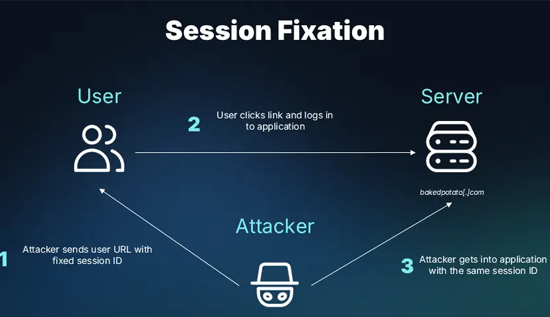
Session hijacking generally involves taking over an existing authenticated session. Session fixation involves causing a victim to authenticate using a session identifier that an attacker already knows or can predict, then attempting to misuse that identifier after authentication.
Key differences
| Feature | Session hijacking | Session fixation |
| Core idea | Taking over a valid session | Tricking the victim into using a known session identifier |
| Typical weakness | Exposed tokens or weak session protections | Failure to replace the session identifier after authentication |
| Main defense | Protect tokens and detect misuse | Regenerate session identifiers after login and privilege changes |
How to Prevent Session Fixation
Applications should generate unpredictable session identifiers and issue a new identifier after successful authentication.
The server should not continue using an attacker-supplied or pre-authentication session identifier as the authenticated session identifier.
Regenerating identifiers after login and privilege changes reduces the chance that a previously known identifier can be reused to gain access.
Session fixation prevention is an important part of broader session hijacking prevention because both issues involve the secure management of session identifiers.
Common Signs of a Session Hijacking Attack
Session hijacking can be difficult to identify because an attacker may use a legitimate session token rather than repeatedly attempting to log in with an incorrect password.
However, certain warning signs may indicate that an account or session has been compromised.
Unexpected Account Activity
Users may notice messages they did not send, settings they did not change, or transactions they do not recognize.
These events can indicate account compromise, although other explanations are possible.
Unexpected Logouts
A website may terminate a session when it detects suspicious activity, changes authentication requirements, or revokes a token.
Unexpected logouts alone do not prove that a session hijacking attack has occurred, but repeated incidents may justify further investigation.
Unfamiliar Devices or Locations
Some services provide a list of recent sign-ins, devices, or active sessions.
Unfamiliar entries can be a warning sign. However, location information is not always precise, and VPNs or mobile networks may make a legitimate session appear to originate elsewhere.
Security Alerts and Authentication Changes
Unexpected password reset messages, multifactor authentication notifications, or account recovery emails may indicate unauthorized activity.
Users should review these alerts carefully and avoid clicking suspicious links.
Unusual Application Behavior
Security teams may identify unusual session activity, such as access to sensitive resources at unexpected times or rapid changes in session behavior.
These signals should be evaluated together rather than treated as conclusive evidence individually.
Session Hijacking Detection: How Organizations Identify Threats
Effective session hijacking detection combines application logging, authentication monitoring, risk analysis, and incident response.
Organizations should focus on identifying suspicious behavior while minimizing unnecessary collection of personal information.
1. Monitor Authentication and Session Events
Applications should record appropriate security events, including:
- Successful and unsuccessful authentication attempts.
- Session creation and termination.
- Session expiration and revocation.
- Changes to account security settings.
- Access to sensitive resources.
- Authentication challenges and recovery events.
Logs should not contain raw session tokens, passwords, or other unnecessary authentication secrets.
2. Identify Unusual Session Patterns
Security systems can analyze session activity for suspicious patterns.
Examples include sudden changes in device characteristics, unexpected access to sensitive resources, unusual request rates, and activity that conflicts with established account behavior.
A change in IP address alone should not automatically be treated as proof of an attack. Mobile networks and VPN services can cause legitimate address changes.
3. Use Risk-Based Authentication
Applications can request additional verification when a session performs an unusually sensitive action or when risk indicators suggest possible compromise.
For example, changing account recovery settings or exporting confidential information may require renewed authentication.
Risk-based checks can reduce the impact of stolen sessions, although they must be implemented carefully to avoid unnecessary friction for legitimate users.
4. Revoke Suspicious Sessions
When a session is believed to be compromised, the application should be able to invalidate it promptly.
Depending on the system, this may involve revoking the session identifier, invalidating refresh tokens, terminating related sessions, or requiring the user to authenticate again.
5. Establish an Incident Response Process
Organizations should define how to investigate suspected session compromise, preserve relevant security logs, notify affected users, and restore secure account access.
A clear response process reduces confusion and helps prevent a compromised session from remaining active longer than necessary.
Session Hijacking Prevention: Essential Security Measures
Session hijacking prevention requires multiple layers of protection. No single setting can eliminate every risk, so applications should combine secure development, authentication safeguards, browser protections, and ongoing monitoring.
1. Enforce HTTPS Everywhere
HTTPS encrypts communication between the browser and the website, helping protect session information while it travels across the network.
Organizations should use valid TLS certificates and redirect HTTP requests to HTTPS.
They should also consider HTTP Strict Transport Security (HSTS), which instructs compatible browsers to use HTTPS for the relevant domain.
HTTPS is essential, but it does not prevent attacks originating from compromised devices or vulnerabilities within the application itself.
2. Configure Secure Session Cookies
Session cookies should use appropriate security attributes.
Important attributes include:
- Secure: Restricts cookie transmission to HTTPS connections.
- HttpOnly: Prevents ordinary JavaScript access to the cookie.
- SameSite: Helps control when browsers send cookies with cross-site requests.
For example, a website might configure a session cookie using the following illustrative HTTP header:
Set-Cookie: __Host-session=RANDOM_SESSION_VALUE; Path=/; Secure; HttpOnly; SameSite=Lax
This is an example of cookie configuration, not a complete session security solution. The application must generate secure session identifiers, manage their lifecycle, and apply suitable server-side authorization checks.
The __Host- prefix also has specific browser requirements, including the use of Secure, a root path, and the absence of a Domain attribute.
3. Generate Strong, Unpredictable Session Identifiers
Session identifiers should be generated using a cryptographically secure random number generator.
They must be difficult to predict, enumerate, or guess.
Applications should avoid using sequential identifiers or embedding sensitive personal information directly in session tokens.
The server should validate session identifiers and reject invalid, expired, or revoked sessions.
4. Regenerate Sessions After Authentication
Applications should issue a new session identifier after successful login and relevant privilege changes.
This practice helps prevent session fixation and reduces the chance that a previously exposed identifier remains useful after authentication.
Old identifiers should be invalidated when appropriate.
5. Apply Appropriate Session Expiration
Session expiration limits how long a compromised identifier can remain useful.
Organizations should consider both idle timeouts and absolute session lifetimes.
- Idle timeout: Ends a session after a period of inactivity.
- Absolute timeout: Ends a session after a maximum period, even if it remains active.
The appropriate duration depends on the sensitivity of the application. A public discussion forum may have different requirements from a financial or administrative system.
Long-lived sessions should receive particular attention because they may increase the period during which a stolen token remains valid.
6. Protect Against Cross-Site Scripting
Because XSS can enable unauthorized actions in a user's browser, developers should adopt secure coding practices throughout the application.
Useful controls include contextual output encoding, safe handling of untrusted HTML, secure JavaScript practices, and Content Security Policy.
The HttpOnly attribute provides an additional barrier against direct cookie reading, but it cannot make a vulnerable website immune to XSS.
7. Use Multifactor Authentication
Multifactor authentication (MFA) requires an additional verification factor beyond a password.
MFA can make account compromise more difficult when an attacker only knows the user's password. However, it does not automatically prevent session hijacking because an attacker who obtains a valid authenticated session may be able to bypass the original login challenge.
For sensitive actions, applications can require renewed authentication or a stronger verification step. Phishing-resistant authentication methods, such as passkeys, can also strengthen the initial authentication process.
8. Avoid Storing Session Tokens in Exposed Locations
Developers should carefully consider where authentication credentials are stored.
For many traditional web applications, appropriately configured cookies are preferable to storing long-lived session credentials in JavaScript-accessible browser storage.
For example, tokens stored in localStorage can be accessible to scripts running in the application's origin, making XSS especially concerning.
The correct design depends on the application architecture, but session credentials should never be unnecessarily exposed to client-side code or placed in URLs.
9. Revoke Sessions After Security Events
Applications should provide a reliable way to invalidate sessions after events such as:
- A password change or account recovery.
- A suspected account compromise.
- A user's request to sign out of all devices.
- An administrator's security intervention.
- A change in permissions that requires a fresh session.
For sensitive systems, revocation should take effect promptly rather than relying exclusively on the original expiration time.
10. Require Reauthentication for Sensitive Actions
An existing login session should not always be sufficient for every operation.
Applications can require users to authenticate again before changing recovery details, modifying security settings, or performing other high-impact actions.
This approach reduces the potential damage from a stolen session token.
11. Keep Browsers and Devices Updated
Browser and operating system updates frequently address security vulnerabilities.
Users should enable automatic updates when appropriate, remove unnecessary extensions, and avoid installing software from untrusted sources.
Organizations should also establish device security policies for employees who access confidential systems.
12. Test Session Management Regularly
Developers should include session security in their testing and security review processes.
Testing should cover token generation, cookie attributes, session expiration, logout behavior, token rotation, authorization checks, and revocation.
Security teams should also verify that a logged-out or revoked session cannot continue accessing protected resources.
How to Prevent Session Hijacking Attacks: A Practical Checklist
The following checklist summarizes important defensive measures for website owners, developers, and everyday users.
Security checklist
0 of 10
Use HTTPS across all pages and authenticated endpoints.
Set Secure, HttpOnly, and suitable SameSite cookie attributes.
Generate unpredictable session identifiers.
Regenerate session IDs after authentication and privilege changes.
Set appropriate idle and absolute session timeouts.
Protect applications against cross-site scripting.
Monitor suspicious session activity and authentication events.
Provide session revocation and sign-out-all-devices options.
Require renewed authentication for sensitive actions.
Keep browsers, operating systems, and applications updated.
Copy checklist
Following these measures can significantly reduce session-related risks, but the appropriate combination depends on the application's design and the sensitivity of its data.
What to Do If You Suspect Session Hijacking
If you believe someone has gained unauthorized access to your account, act quickly to reduce the potential impact.
For individual users:
- Open the service through its official website or application.
- Use the account's security settings to sign out of unfamiliar sessions or all devices.
- Change your password from a trusted device if account compromise is suspected.
- Review recovery settings, multifactor authentication methods, and recent account activity.
- Enable multifactor authentication if it is available.
- Contact the service provider if you cannot regain control or identify unauthorized activity.
Changing a password alone may not invalidate every existing session. Use the service's session-revocation options where available.
If the device itself may be compromised, secure it before using it to manage sensitive accounts.
For organizations:
Security teams should revoke suspected compromised sessions, assess relevant authentication and application logs, determine which resources may have been accessed, and follow the organization's incident response procedures.
Where necessary, teams should notify affected users and involve qualified security professionals.
The goal is to terminate unauthorized access, understand the cause, and address the weakness that allowed the incident to occur.
The Future of Session Security
Web applications increasingly use cloud services, APIs, single sign-on, mobile clients, and distributed authentication systems. These technologies make session management more complex because a user's authenticated activity may involve several services.
Organizations should therefore treat session security as an ongoing responsibility rather than a one-time configuration task.
Several practices are particularly important:
Zero-trust security: Applications should verify identity and authorization for relevant requests rather than automatically trusting every request because it comes from an existing session.
Short-lived credentials: Access tokens with appropriate lifetimes can limit the period during which compromised credentials remain useful. Token rotation and revocation should be designed carefully.
Continuous risk assessment: Monitoring session activity can help identify unusual behavior and trigger additional verification when necessary.
Secure-by-design development: Developers should include session protection in the application's architecture, coding standards, testing, and maintenance processes.
Privacy-aware monitoring: Organizations should collect only the security information they need, restrict access to logs, and protect retained data from misuse.
No security technology can eliminate every attack, but layered controls can make session compromise more difficult and reduce its potential consequences.
Conclusion
Session hijacking is an important cybersecurity threat because it can allow an attacker to misuse an authenticated session without necessarily knowing the victim's password. Session cookie theft, browser vulnerabilities, insecure communication, compromised devices, and weak session management can all contribute to this risk.
Effective session hijacking prevention starts with strong session identifiers, secure cookie configuration, HTTPS, session expiration, and protection against cross-site scripting. Additional safeguards include multifactor authentication, session revocation, renewed authentication for sensitive actions, and continuous security monitoring.
Organizations should also implement session hijacking detection through appropriate logging, risk analysis, and incident response procedures. Individuals can reduce their exposure by keeping devices updated, reviewing account activity, and signing out of unfamiliar or shared devices.
Ultimately, protecting an authenticated session is just as important as protecting the login process. By combining secure development practices with responsible account management, users and organizations can significantly reduce the risk of unauthorized session access.
More Articles
 16 Oct 2026
Orphan Pages in SEO: How to Find and Fix Them
Identify orphan pages in SEO and apply practical strategies to improve internal linking and discoverability.
 14 Oct 2026
Topical Authority vs Keyword Density: Which is Better?
Learn the difference between topical authority vs keyword density, how both affect SEO, and how to create helpful content that improves relevance, builds trust, and supports better search rankings.
 09 Oct 2026
Fake ChatGPT Websites: How to Spot a Scam
Protect your accounts and devices by recognizing fake ChatGPT websites, phishing scams and fraudulent AI applications.
 07 Oct 2026
Browser-in-the-Browser: How Hackers Steal Passwords
Browser-in-the-Browser attacks trick users with fake login windows, real examples and practical ways to protect your passwords.