Passkeys vs Passwords: Security Comparison
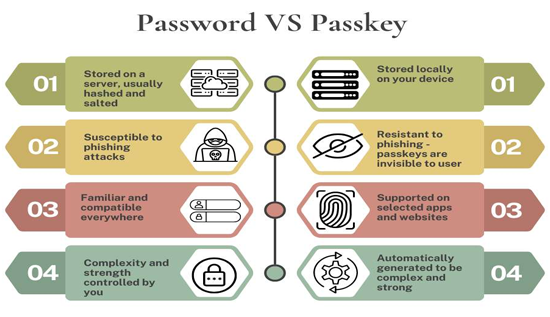
Discover how passkeys compare to traditional passwords, learn how passwordless authentication works, and find out which option offers better security for protecting your online accounts.
Cybersecurity threats continue to evolve, making it more important than ever to protect online accounts. For decades, passwords have been the standard method for securing digital identities. However, the rise of passkeys has introduced a safer and more convenient alternative.
Many people are now asking questions like should I use passkeys instead of passwords, what are passkeys and how do they work, and passkeys vs passwords which is more secure. The answers are transforming how individuals and businesses think about online security.
In this comprehensive guide, we'll explain Passkeys vs Passwords, compare their security strengths, discuss how passwordless authentication works, and help you determine which solution is best for your online accounts.
What Are Passwords?
Passwords are secret combinations of letters, numbers, and symbols that users create to verify their identity when logging into websites, applications, or devices.
A password works by:
- Creating a secret known only by the user.
- Storing a hashed version on the website's server.
- Comparing the entered password with the stored hash during login.
Although passwords have protected online accounts for decades, they come with significant security challenges.
Common Password Problems
- Weak passwords
- Password reuse
- Forgotten passwords
- Password theft
- Phishing attacks
- Data breaches
- Credential stuffing
These issues have led cybersecurity experts to develop stronger alternatives.
What Are Passkeys?
To understand passkeys explained, think of them as a modern replacement for passwords.
Instead of remembering a secret phrase, your device creates a pair of cryptographic keys:
- A public key, stored on the website.
- A private key, stored securely on your phone, computer, or security hardware.
The private key never leaves your device.
When logging in, your device proves ownership of the private key using:
- Fingerprint
- Face recognition
- Device PIN
- Security key
This eliminates the need to type passwords.
What Are Passkeys and How Do They Work?
One of the most common questions is:
What are passkeys and how do they work?
Here's a simplified process.
Step 1: Create a Passkey
When you create an account, your device generates:
- Public Key
- Private Key
Only the public key is shared with the website.
Step 2: Store the Private Key
The private key stays securely inside:
- Secure Enclave (Apple)
- Trusted Platform Module (Windows)
- Titan M chip (Google)
- Hardware security module
It cannot be copied by websites.
Step 3: Authenticate
When logging in:
- Website sends a challenge.
- Device signs it using the private key.
- Website verifies using the public key.
- Access is granted.
The private key never travels across the internet.
Passkeys Explained in Simple Terms
Imagine two locks.
Traditional passwords work like giving someone a secret code.
Passkeys work like owning a unique digital key that cannot be copied.
Even if someone steals information from a website, they cannot log in without your device.
This is why cybersecurity professionals increasingly recommend passkeys.
Passkeys vs Passwords
The debate over Passkeys vs Passwords centers on security, convenience, and user experience.
Let's compare them across important categories.
1. Security
Passwords
Passwords are vulnerable to:
- Guessing
- Dictionary attacks
- Brute-force attacks
- Credential stuffing
- Database leaks
Even strong passwords may eventually become compromised.
Passkeys
Passkeys use public-key cryptography.
Benefits include:
- No shared secret
- Private key never leaves device
- Resistant to phishing
- Resistant to database breaches
Winner: Passkeys
2. Phishing Protection
Phishing is one of the biggest online threats.
Passwords
Users may accidentally type passwords into fake websites.
Attackers instantly steal them.
Passkeys
Passkeys only work with the legitimate website.
A fake site cannot trick your device into revealing the private key.
Winner: Passkeys
3. Password Reuse
Millions of users reuse passwords across multiple accounts.
If one website is hacked:
- Email compromised
- Banking compromised
- Social media compromised
Passkeys automatically create unique credentials for every website.
Winner: Passkeys
4. Convenience
Passwords
Users often:
- Forget passwords
- Reset passwords
- Use password managers
Passkeys
Login typically requires:
- Face ID
- Fingerprint
- Device PIN
No typing required.
Winner: Passkeys
5. Recovery
Passwords can usually be reset using email.
Passkeys rely on:
- Device backup
- Cloud synchronization
- Recovery methods
While recovery is improving, it may require a little more planning.
Winner: Passwords (slightly)
6. Compatibility
Passwords work almost everywhere.
Passkeys are supported by most major platforms but not every website yet.
Current support includes:
- Apple
- Microsoft
- GitHub
- Amazon
- PayPal
- Many banking and enterprise services
Winner: Passwords (for compatibility today)
Password vs Passkey Security
When comparing password vs passkey security, the differences are significant.
| Feature | Passwords | Passkeys |
|---|---|---|
| Phishing resistant | ❌ | ✅ |
| Database breach protection | ❌ | ✅ |
| Password reuse | ❌ | ✅ |
| Brute-force resistance | Limited | Excellent |
| User convenience | Moderate | High |
| Biometrics support | Optional | Built-in |
| Shared secret | Yes | No |
Overall, passkeys provide much stronger protection.
Passwordless Authentication Explained
A major advantage of passkeys is passwordless authentication.
Passwordless authentication removes the need for users to remember passwords.
Instead, identity is verified using:
- Biometrics
- Device ownership
- Cryptographic keys
- Hardware security
Benefits include:
- Faster login
- Improved security
- Better user experience
- Lower IT support costs
- Fewer password resets
Many organizations are adopting passwordless authentication to reduce cyber risks.
Why Passkeys Are More Secure
Several technical reasons explain why passkeys outperform passwords.
Public Key Cryptography
Only the public key is stored online.
Hackers cannot use it to impersonate users.
No Shared Secret
Traditional passwords require both the user and server to know the same secret.
Passkeys eliminate this weakness.
Device Protection
Private keys remain protected by secure hardware.
Even malware has difficulty extracting them.
Phishing Resistance
A passkey only works with the correct website domain.
Fake websites cannot steal credentials.
Automatic Unique Credentials
Every website receives its own cryptographic key pair.
No credential reuse.
Should I Use Passkeys Instead of Passwords?
One of today's biggest cybersecurity questions is:
Should I use passkeys instead of passwords?
For most people, the answer is yes.
Passkeys provide:
- Better security
- Easier login
- Reduced phishing risk
- Stronger protection against hackers
- Less password fatigue
However, you may still need passwords for services that haven't adopted passkeys.
For now, using both is common.
Passkeys vs Passwords Which Is More Secure?
The evidence strongly favors passkeys.
Reasons include:
- Impossible to guess
- Impossible to reuse
- Resistant to phishing
- Resistant to brute-force attacks
- Resistant to database breaches
- Protected by secure hardware
Therefore, when asking passkeys vs passwords which is more secure, cybersecurity experts generally recommend passkeys whenever available.
Passkeys vs Passwords for Online Accounts
When considering passkeys vs passwords for online accounts, different account types have different priorities.
Banking
Passkeys significantly reduce phishing attacks.
Excellent choice.
Since email controls password resets for many services, using passkeys greatly improves security.
Social Media
Passkeys help prevent stolen credentials from fake login pages.
Cloud Storage
Protecting sensitive files with passkeys adds another layer of defense.
Work Accounts
Businesses increasingly deploy passwordless authentication to improve security.
Advantages of Passkeys
The benefits of passkeys continue to grow.
Better Security
Cryptographic authentication is much stronger than passwords.
Faster Login
Face recognition takes seconds.
No Password Memory
Nothing to remember.
Less IT Support
Organizations save money on password resets.
Cross-Platform Support
Passkeys can synchronize securely across trusted devices, making them convenient without sacrificing security.
Disadvantages of Passkeys
Although powerful, passkeys are not perfect.
Some limitations include:
- Older websites may not support them.
- Recovery methods vary by platform.
- Users must protect their devices.
- Learning curve for first-time users.
These issues are becoming less significant as adoption increases.
Advantages of Passwords
Passwords still offer some benefits.
- Universal support
- Familiar to users
- Easy account recovery
- No specialized hardware required
However, their security depends heavily on users creating strong, unique passwords and enabling additional protections.
Best Practices for Using Passwords
If you still rely on passwords:
- Use at least 16 characters.
- Avoid personal information.
- Use a password manager.
- Enable multi-factor authentication (MFA).
- Never reuse passwords.
- Change passwords after a breach.
- Watch for phishing emails and fake websites.
Best Practices for Using Passkeys
To get the most from passkeys:
- Enable device encryption.
- Keep operating systems updated.
- Protect devices with biometrics or a strong PIN.
- Use secure cloud synchronization when available.
- Register multiple trusted devices.
- Set up account recovery options.
- Remove passkeys from devices you no longer use.
Password Managers vs Passkeys
Password managers remain valuable because many websites still require passwords.
Password managers:
- Generate strong passwords.
- Store passwords securely.
- Autofill credentials.
- Monitor for compromised passwords.
Passkeys complement password managers rather than replacing them entirely. Many password managers now support storing and syncing passkeys alongside traditional passwords.
The Future of Passwordless Authentication
Technology companies are investing heavily in passwordless authentication.
Future trends include:
- More websites supporting passkeys
- Enterprise-wide passwordless logins
- Improved cross-device syncing
- Stronger phishing resistance
- Wider adoption across banking, healthcare, and government services
Over time, passwords are likely to become less common as passkeys become the preferred authentication method.
Frequently Asked Questions
Are passkeys safer than passwords?
Yes. Passkeys use public-key cryptography, making them resistant to phishing, password reuse, and database breaches.
Can hackers steal passkeys?
Stealing a passkey is much harder than stealing a password because the private key stays securely on your device and is protected by secure hardware and local authentication.
Do passkeys replace two-factor authentication?
In many cases, passkeys provide security comparable to or stronger than passwords combined with traditional two-factor authentication. Some organizations may still require additional verification for sensitive actions.
Can I still use passwords?
Yes. Many services continue to support passwords, and some have not yet implemented passkeys.
Are passkeys free?
Yes. Major operating systems and supported websites typically offer passkeys at no additional cost.
Conclusion
The debate over Passkeys vs Passwords highlights a major shift in online security. Traditional passwords have served users for years, but they are increasingly vulnerable to phishing, credential theft, password reuse, and large-scale data breaches. In contrast, passkeys use modern cryptography and passwordless authentication to provide stronger protection while making sign-ins faster and more convenient.
Understanding passkeys explained and what are passkeys and how do they work shows why many security experts recommend adopting them whenever possible. When comparing password vs passkey security, passkeys clearly offer significant advantages by eliminating shared secrets, resisting phishing attacks, and keeping private keys safely on your device.
If you're wondering should I use passkeys instead of passwords, the answer is yes for any service that supports them. While passwords will remain necessary for some websites during the transition, the future points toward passwordless authentication. For anyone evaluating passkeys vs passwords for online accounts or asking passkeys vs passwords which is more secure, passkeys are the stronger, safer, and more user-friendly choice for protecting your digital life.
More Articles
 26 Aug 2026
Best Privacy Browsers in 2026: Brave, Tor & More
Compare the best privacy browsers 2026 and DuckDuckGo for stronger tracking and fingerprint protection.
 25 Aug 2026
What Is an Infostealer? How It Steals Your Passwords
What is infostealer malware? Learn how infostealers steal passwords, browser cookies and personal data, how to detect an infection, and how to protect your devices.
 21 Aug 2026
How AI Search Is Changing SEO: Things You Must Know
See how AI search is changing SEO, from AI Overviews and AI Mode to content optimization and search visibility.
 19 Aug 2026
Unsafe Websites to Avoid: 10 Warning Signs of a Scam
Spot unsafe websites to avoid with 10 key scam warning signs, including fake URLs, suspicious payments and fraudulent offers.