QR Code Scams: How to Spot and Avoid Fake QR Codes
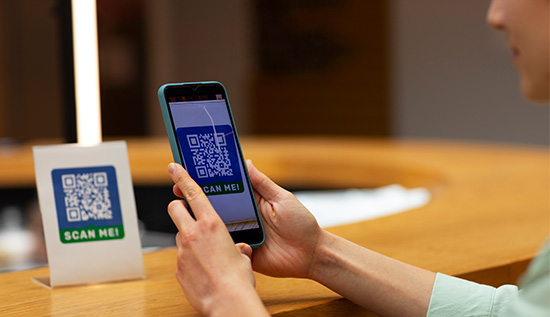
Learn how QR code scams work, spot fake codes, recognize warning signs and protect your personal information.
QR codes have become part of everyday life. Restaurant menus, payment counters, product packaging, event tickets, advertisements, parking meters, business cards, emails and even public signage all have them.
Users can open a webpage, make a payment, download information or access an internet service with a simple smartphone scan. QR codes have become incredibly popular due to their convenience, but they have also given fraudsters more options also.
QR code scams are becoming a growing cybersecurity concern due to the fact that individuals frequently trust QR codes without verifying their destination. A QR code conceals its destination until it is scanned, in contrast to a conventional webpage link.
A criminal can replace a legitimate QR code with a fake QR code that redirects victims to a malicious website, requests sensitive information or tricks them into making a payment.
The risk lies in the fact that QR codes are not intrinsically harmful. They are merely a means of information encoding. The issue arises when thieves utilize them to distribute malware, phishing websites, fraudulent payments or other dishonest acts. This implies that even a QR code that appears to be in a trustworthy area could pose a security concern also.
Understanding what is a QR code fraud and users can safeguard their funds, accounts and personal data by identifying frequent warning indicators. Taking a few seconds to confirm a QR code you come across in an email, text message, restaurant, parking lot, social media post or public place might help you avoid making an expensive error.
This article explains how do QR code scams work, the most common types of attacks, warning signs to watch for, practical examples and effective steps for how to avoid QR code fraud. You may continue to take advantage of QR technology's ease while lowering your risk of falling victim to online fraud by adopting safer scanning practices.
Read More: Digital Wallets and the Future of Payments in Cambodia
What Is a QR Code Scam?
A QR code fraud happens when fraudsters utilize a QR code to deceive someone into accessing a hazardous website, disclosing sensitive information, downloading harmful software, or sending money to a false account.
To understand what is a QR code scam, it helps to remember that scanning a QR code normally feels harmless. Your phone camera recognizes the code and displays a link or action. Because the process is quick and familiar, many people scan without checking the destination.
Scammers take advantage of this behavior. A criminal may create a QR code that looks completely normal but redirects users somewhere dangerous. For example, a QR code displayed next to a parking meter could be replaced with one leading to a fraudulent payment page. A victim may enter their card details because they believe they are paying for parking.
Some attacks are more sophisticated. A quashing scam might create an email pretending to come from a bank, delivery company, employer, or online service. The message may claim that the recipient needs to verify their account.
Instead of providing a normal clickable link, the email contains a QR code. Scanning it takes the victim to a phishing page designed to steal login credentials. This type of attack is often referred to as QR code phishing.
Why QR codes are attractive to scammers
QR codes provide several advantages for criminals: they can hide the actual destination URL, users may trust codes displayed in professional-looking locations, smartphone security habits are often weaker than computer security habits, QR codes can be printed and placed over legitimate codes, they can be distributed through physical and digital channels and victims may scan them quickly without inspecting the destination.
A QR code fraud can therefore combine social engineering with technology. The QR code itself does not necessarily exploit your phone. Instead, it encourages you to take an action that benefits the attacker.
QR codes and social engineering
Social engineering is a major component of modern cybercrime. Rather than relying only on technical vulnerabilities, criminals manipulate people into making unsafe decisions.
For example, a message might say: “Your account will be suspended today. Scan this QR code to verify your identity.”
The urgency makes the recipient more likely to scan without thinking.
Other messages may use fear, curiosity, rewards or convenience: “Your package could not be delivered.” “Claim your exclusive reward.” “Confirm your payment.” “Verify your account.” “Scan to receive a discount.” “Your parking payment has expired.”
The QR code simply becomes the bridge between the victim and the scammer's website.
How Do QR Code Scams Work?
Understanding how do QR code scams work can make suspicious QR codes much easier to recognize. Most attacks follow a similar pattern, although criminals may change the message, location or final objective.
Step 1: The scammer creates a malicious destination
The attacker first creates a website or payment destination designed to achieve a specific goal. It could imitate a bank login page, payment service, delivery company, social media platform or online store. The website may look professional and use logos, colors and language copied from a legitimate organization.
Step 2: A malicious QR code is created
The attacker converts the fraudulent URL or payment information into a QR code. The resulting code may look identical to any ordinary QR code. This is why visual inspection alone is not always enough.
A malicious QR code can look completely harmless because the dangerous part is the destination encoded inside it.
Step 3: The QR code reaches potential victims
Criminals can distribute QR codes through many channels, including: phishing emails, text messages, Social media, fake advertisements, posters, parking machines, restaurant tables, flyers, package notices, fake invoices, public charging stations and online marketplaces.
Physical replacement is particularly concerning. A criminal may place a sticker containing a fraudulent QR code over a legitimate code.
Step 4: The victim scans the code
The victim scans the QR code with their smartphone. Depending on the phone and application, a link or action appears. At this point, the victim may assume that because the QR code was easy to scan, it must be safe.
Step 5: The victim is redirected
The QR code may open a website that asks the user to: enter a username and password, provide credit card information, enter a one-time verification code, make a payment, download an application, provide personal information and approve a transaction.
If the victim completes the requested action, the attacker may obtain valuable information or money.
Example 1: Fake parking payment
Imagine you park your car in a busy area and find a QR code attached to a parking sign. The code says you can pay digitally. You scan it and are taken to a website that looks like the parking company's official payment page.
You enter your license plate number and credit card details. The payment appears successful, but the information has actually gone to criminals.
This is a common social-engineering pattern because the victim is already expecting to make a payment.
Example 2: Fake delivery notification
You receive a text message claiming that your package cannot be delivered because your address needs verification. The message contains a QR code.
After scanning, you see a familiar-looking delivery website requesting a small “redelivery fee.”
You enter your card details. The small payment may be the scammer's excuse for collecting your financial information.
QR code fraud can have different goals
QR code fraud is not limited to stealing passwords. Depending on the attack, criminals may attempt to: steal banking credentials, capture payment-card information, take over online accounts, collect personal data, install malicious software, redirect cryptocurrency payments, commit identity theft and trick users into authorizing transactions.
Because the techniques can vary, users should focus on verifying the destination and purpose rather than simply asking whether the QR code looks legitimate.
Common Types of QR Code Scams
Not every QR-related attack works the same way. Understanding the most common variations can help you identify suspicious situations before scanning.
1. Phishing QR codes: Phishing QR codes direct users to fraudulent websites designed to steal information. These websites can imitate banks, email providers, social networks, payment platforms or other trusted services.
This is one reason QR code phishing can be particularly effective. The victim may not see the suspicious URL until after scanning.
2. Payment scams: A criminal may create a QR code that sends money to the wrong account. This can happen in fake invoices, marketplace transactions, donations or payment requests. Before approving a transaction, carefully verify the recipient’s name and amount.
3. Fake promotional QR codes: Scammers may advertise unrealistic discounts, prizes, coupons, or giveaways. The QR code leads to a website requesting personal information or payment details. For example, a poster might promise a 90% discount on a popular product but require users to scan a QR code and “register” with their card information.
4. Physical QR code replacement: A scammer may place a sticker over an authentic QR code in a public location. Potential targets include: restaurant menus, parking meters, payment terminals, public information boards, event posters and store displays. Because the physical location appears legitimate, users may trust the replacement code.
5. QR codes in emails: A QR code can be used to bypass some people's suspicion of clickable links. Instead of asking users to click a suspicious URL, the attacker asks them to scan a code with their phone. The email might claim that scanning is required to complete a security check.
6. Malicious software downloads: Some QR codes can direct users toward applications or downloads that may contain malware. This risk is particularly relevant when the website encourages the user to install software outside the official app store.
Never assume an application is safe simply because the installation link came from a QR code.
Read More: Digital Payment Ecosystem Cambodia: Mobile & QR Payments
How to Spot a Fake QR Code
Knowing how to spot a fake QR code is one of the most useful skills for protecting yourself from QR-based attacks. A QR code itself may not provide obvious clues. Instead, pay attention to the surrounding message, physical environment, URL and requested action.
1. Inspect the destination before continuing: After scanning, your phone may display the website address before opening it. Check the domain carefully.
Watch for: misspelled company names, strange domain extensions, extra words or characters, unusual subdomains, random strings and domains unrelated to the organization.
For example, a website pretending to represent a financial institution might use a domain that looks similar to the real one but contains an extra word or misspelling.
2. Be suspicious of unexpected QR codes: If someone unexpectedly sends you a QR code asking you to resolve an account problem, stop and verify the message independently. Instead of scanning the code, open the company's official website or application yourself.
3. Check for physical tampering: When scanning a QR code in public, look closely at the printed code. A sticker placed over another code can be a warning sign.
Check whether: the sticker looks different from the surrounding material, the edges appear raised, the design does not match the original, the QR code appears poorly printed and instructions contain unusual spelling or grammar.
Physical tampering does not automatically mean the code is fraudulent, but it should encourage additional verification.
4. Watch for urgency: Scammers often create pressure. Be cautious when a QR code claims: your account will close immediately, you must pay within minutes, your package will be returned today, your security verification has expired and you have won a limited-time reward.
Legitimate organizations can use deadlines, but urgency should never prevent you from verifying the request.
5. Don't provide sensitive information unnecessarily: Ask yourself why the QR code needs the requested information. If you scan a code to view a restaurant menu, there is normally no reason for it to request your banking password. If a simple service suddenly asks for highly sensitive information, stop.
6. Verify payment details: Before confirming a payment, check the recipient, amount and transaction details. If the displayed recipient does not match the organization or person you intended to pay, cancel the transaction.
How to Avoid QR Code Scams
Knowing how to avoid QR code scams requires a combination of awareness, verification and basic cybersecurity habits.
1. Don't scan blindly: Treat QR codes like links. You would not normally click every link sent by a stranger, so apply the same caution to QR codes.
2. Use trusted applications: For payments, banking, tickets and other sensitive activities, use the organization's official mobile application whenever possible. If a QR code takes you to a login page, consider closing it and opening the official app manually.
3. Verify unexpected requests: If a QR code arrives through email or text and asks you to make a payment or verify an account, contact the organization through an official channel. Do not use contact information contained in the suspicious message.
4. Keep your phone updated: Operating-system and application updates often include security improvements. Keeping your smartphone updated reduces exposure to known vulnerabilities.
5. Don't download unknown applications: If scanning a QR code tells you to install an unfamiliar application or file, stop and investigate first. Use official app stores and verify the developer before installing software.
6. Check financial transactions carefully: QR-based payment systems are convenient, but convenience should not replace verification. Before sending money: confirm the recipient, confirm the amount, check the payment description, verify the business or individual independently, stop if anything looks unusual and use security tools.
Security software, browser protections, and built-in smartphone security features can provide additional protection. However, technology should support, not replace, careful decision-making.
What to Do If You Scan a Suspicious QR Code
Even careful users can make mistakes. If you scan a suspicious code, don't panic. Your next steps depend on what happened after the scan.
If the QR code only opened a webpage and you did not enter information, download anything or approve a transaction, close the page and avoid interacting with it further.
If you entered a password, change it immediately from the legitimate service's official website or app. If you reused that password elsewhere, change it on those accounts too.
If you entered financial information, contact your bank or card provider as soon as possible. Monitor your account for suspicious transactions.
If you downloaded an unfamiliar application or file, disconnect from sensitive accounts and investigate the device for signs of compromise. Consider using reputable security software or professional technical support.
If money was transferred, contact your financial institution immediately. Rapid reporting may improve the chances of stopping or recovering a fraudulent transaction.
You should also report the scam through the relevant platform or organization where you encountered it.
Evidence Guide: How to Evaluate a QR Code Safely
Before scanning or acting on a QR code, use this simple evidence checklist.
- Source evidence: Ask: Who provided the QR code? Was I expecting it? Is the source trustworthy? Does the physical location make sense?
- Destination evidence: After scanning: What domain does the QR code open? Does the domain match the official organization? Is the website using suspicious spelling? Does the website ask for unnecessary information?
- Transaction evidence: If money is involved: Who will receive the payment? Is the amount correct? Does the recipient match your intended business or person? Was the payment request expected?
- Context evidence: Consider whether the request makes sense. A restaurant QR code leading directly to a menu is reasonable. A restaurant QR code suddenly requesting your banking password is not. The key principle is simple: verify before you trust.
Why QR Code Scams Are Difficult to Detect
One reason QR code fraud continues to be effective is that users often focus on the code rather than its destination.
A QR code is simply a visual representation of data. There is usually no obvious visual difference between a legitimate QR code and one created by a criminal.
The same black-and-white square pattern could lead to: a legitimate company website, a payment pages, a phishing site, a malicious download, a fraudulent payment address. This means security depends heavily on what happens after scanning.
Another problem is that QR codes can cross the boundary between physical and digital environments. A victim might see a legitimate-looking sign in a real-world location and assume the QR code must be legitimate.
Criminals understand this psychological shortcut. For example, a fake QR code attached to a genuine parking machine can appear more trustworthy than a suspicious link received from an unknown email address even though both could ultimately lead to the same type of fraudulent website.
Conclusion
QR codes are useful, convenient, and increasingly common in everyday life. Avoiding them completely is not necessary. The more practical approach is to understand the risks and develop safer scanning habits.
The biggest lesson from QR code fraud is that the code itself should never be treated as proof of legitimacy. A QR code can be created by anyone and its appearance does not tell you whether the destination is trustworthy.
Before scanning, consider where the code came from and why you are being asked to use it. After scanning, inspect the destination before entering information or making a payment. If the website address looks strange, the request feels unexpected or the transaction details do not match your expectations, stop.
Remember the warning signs: unexpected QR codes, urgent messages, suspicious websites, physical stickers covering legitimate codes, unusual payment requests and demands for sensitive information.
Good cybersecurity habits are often simple. Take a moment to verify instead of acting immediately. Use official apps and websites for sensitive transactions. Keep your devices updated, avoid unknown downloads and contact organizations through trusted channels when something seems suspicious.
Most importantly, treat a QR code the same way you would treat an unfamiliar link. A quashing scam rely heavily on trust and quick reactions. Slowing down and checking the evidence can significantly reduce the chance of becoming a victim.
QR technology is not the enemy. The real risk comes from how criminals use it to manipulate people. With awareness, verification and careful digital habits, you can continue using QR codes safely while protecting your personal information, accounts and money from evolving online threats.
Read More: QR Code Generator: Free Tools & Tips for Custom QR Code Creation
More Articles
 07 Oct 2026
Browser-in-the-Browser: How Hackers Steal Passwords
Browser-in-the-Browser attacks trick users with fake login windows, real examples and practical ways to protect your passwords.
 07 Oct 2026
QR Code Scams in Cambodia: How to Spot Fake QR
Learn about QR code scams in Cambodia, fake KHQR payments, warning signs, and simple ways to check QR codes and stay safe when making digital payments.
 02 Oct 2026
Best Password Managers: Free & Secure Options
Compare the best password managers, including free and secure options, with key features and practical security tips.
 30 Sep 2026
Credential Theft: How Hackers Steal Your Passwords
See how hackers steal passwords through phishing, malware, fake websites and plus practical steps for stronger account security.